
The right approver, automatically
Approvers are selected based on configured Delegation or Schedule of Authority rules, reducing manual routing and approval delays.
Every approval. The right approver. Every time. Automate approval routing with configurable Delegation and Schedule of Authority rules - eNFA identifies the right approvers, moves requests through each stage, and gives teams complete visibility from submission to final decision.
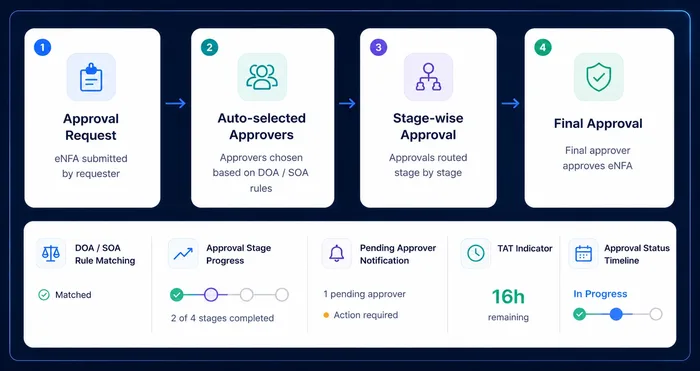
Approvers are selected based on configured Delegation or Schedule of Authority rules, reducing manual routing and approval delays.
Track the status of every approval request across its complete journey, from submission to final decision.
Automatic forwarding, reminders and escalation workflows help reduce time spent waiting between approval stages.
Maintain a clear record of approval decisions, routing logic, timestamps and actions for better traceability and governance.
Map your Delegation or Schedule of Authority for each Strategic Business Unit (SBU) and function, for budgeted, excess or non-budgeted approvals.
The request is automatically validated against predefined Delegation and Schedule of Authority rules based on SBU, function, budget status and approval thresholds.
The approval task moves automatically to the next approver in accordance with the predefined DOA/SOA, with email notification and a pending task.
The request routes through the configured multi-level approval workflow, with each stage progressing automatically upon approval.
Reminders are sent to approvers on the schedule your organization configures.
TAT and analytical reports track the time taken at every stage of the procurement approval process.
Configure Delegation of Authority and Schedule of Authority rules across SBUs, functions, purchase groups and approval scenarios - supporting budgeted, excess-budget and non-budgeted purchase paths.
Automatically identify the right approver based on configured organizational rules, purchase groups, authority levels and approval conditions - no manual routing, no uncertainty.
See current approval status, pending approver, completed stages, approval history and time taken at each stage.
Approval tasks move automatically to the next approver per DOA/SOA rules, with email notifications for new tasks, pending actions, forwarded approvals and completion.
Analytical reports highlight approval turnaround time at each stage, surfacing bottlenecks, delayed stages and approver-level delays.
Send configurable reminders to approvers based on your organization's preferred approval timelines - keeping pending approvals moving without manual follow-up.
Optional Single Sign-On lets approvers access and act on approval requests without repeatedly logging into procurEngine.
We'll walk through DOA/SOA routing mapped to your own approval hierarchy.